

 Dansk
 Svenska
 Deutsch
 Norsk bokmål
Campaign types and what each one does
There are four kinds of campaign. The type decides how the discount is worked out at
checkout, and it cannot be changed after the campaign is created, so be sure
before saving. To create one, see Run your first campaign.
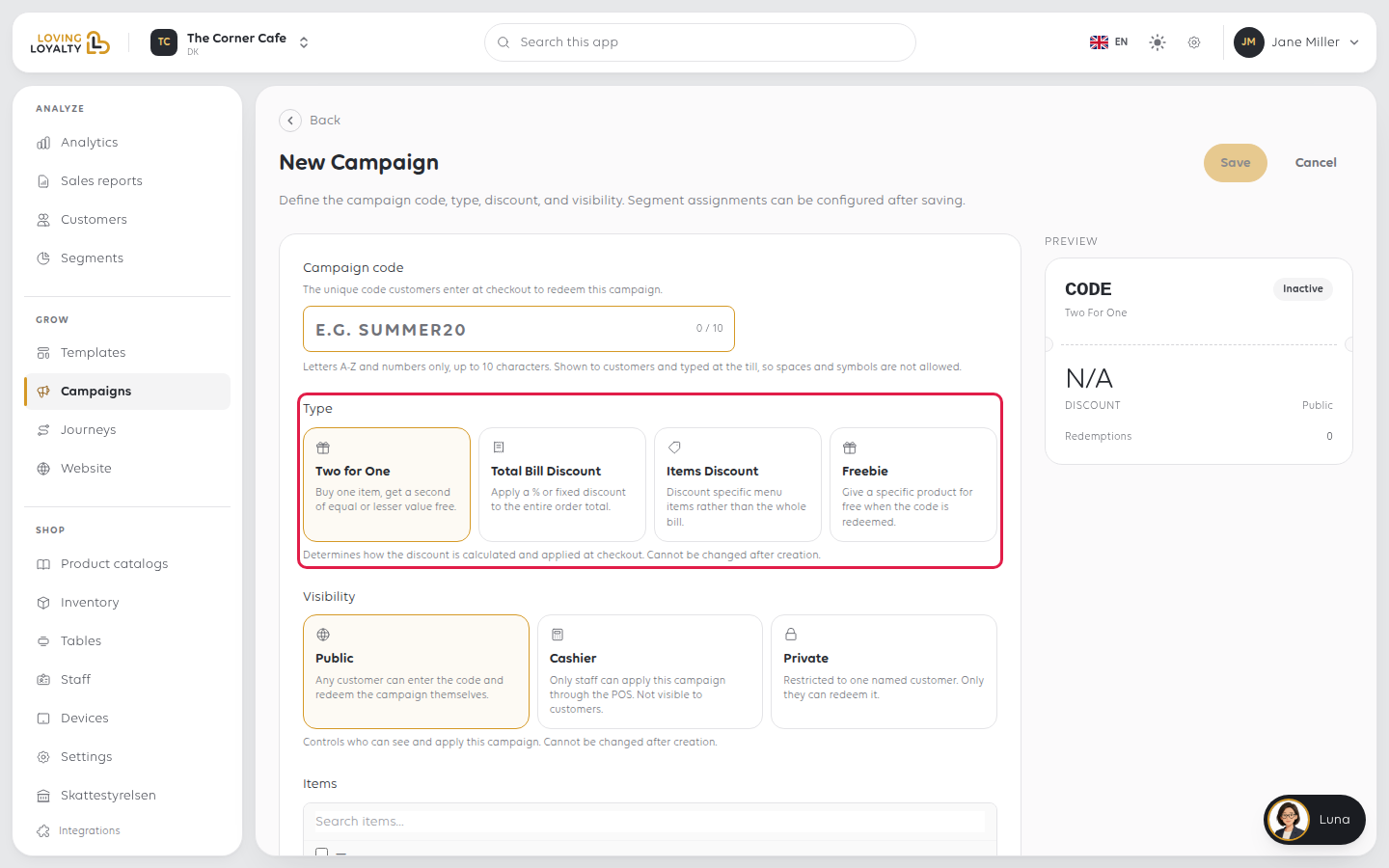
Two for One
Buy one item, get a second of equal or lesser value free.
Use it to move a specific product, or to get a second person through the door with
the first. You choose which products it covers under Items, and it will not save
without at least one. Because the free item is the cheaper of the two, a customer
cannot pair an expensive item with a cheap one and get the expensive one free.
Total Bill Discount
A percentage or a fixed amount off the whole order.
The simplest kind, and the one to reach for when the point is the visit rather than
the product: 20% off everything this weekend, or DKK 50 off your order.
Items Discount
A discount on particular products rather than the whole bill.
Use it when the offer is about specific things: the pastries, the lunch menu, a line
you are clearing. You choose the products under Items, and it will not save
without at least one.
Freebie
A specific product free when the code is redeemed.
A giveaway rather than a discount: a coffee with any breakfast, a dessert on a
birthday. You pick the Freebie item. To give it only when the customer orders
something specific, add Trigger items; leave them empty to give it with any order.
Choosing between them
| If you want to… | Use |
|---|---|
| Discount the whole order | Total Bill Discount |
| Discount particular products | Items Discount |
| Give something away outright | Freebie |
| Get a second item or second person in | Two for One |
Whichever you choose, the type and the visibility are both fixed once the
campaign exists. Creating a replacement is the only way to change either.
Visibility also decides where a campaign can be redeemed, not just by whom.
Cashier campaigns are the only ones that reach the till, where they appear as
discount codes; public and private campaigns are redeemed by the customer
and cannot be applied at the counter.
What a campaign looks like when a cashier applies it
At the till a campaign is applied the same way as any other discount: open the order,
ADD DISCOUNT, DISCOUNT CODE, pick it from the list, Apply.
It then shows exactly like a hand-entered discount, on the item line and under
TOTALS with the percentage beside it. A 15% campaign on a DKK 86 order reads
Discount -DKK 12.90 (15%) and leaves DKK 73.10 to pay, with REMOVE DISCOUNT
to take it off again.
Nothing on the order names the campaign, so a cashier cannot tell afterwards whether
a discount came from a campaign or was keyed in by hand. The campaign's own
Redemptions count in Grow → Campaigns is where that is recorded.
Was this article helpful?
Thanks for your feedback!
