

 Dansk
 Svenska
 Deutsch
 Norsk bokmål
Find a setting, and why one is missing
Open Settings
Open Settings under Shop in the menu on the left, or select the cog icon at
the top right of the screen.
The groups
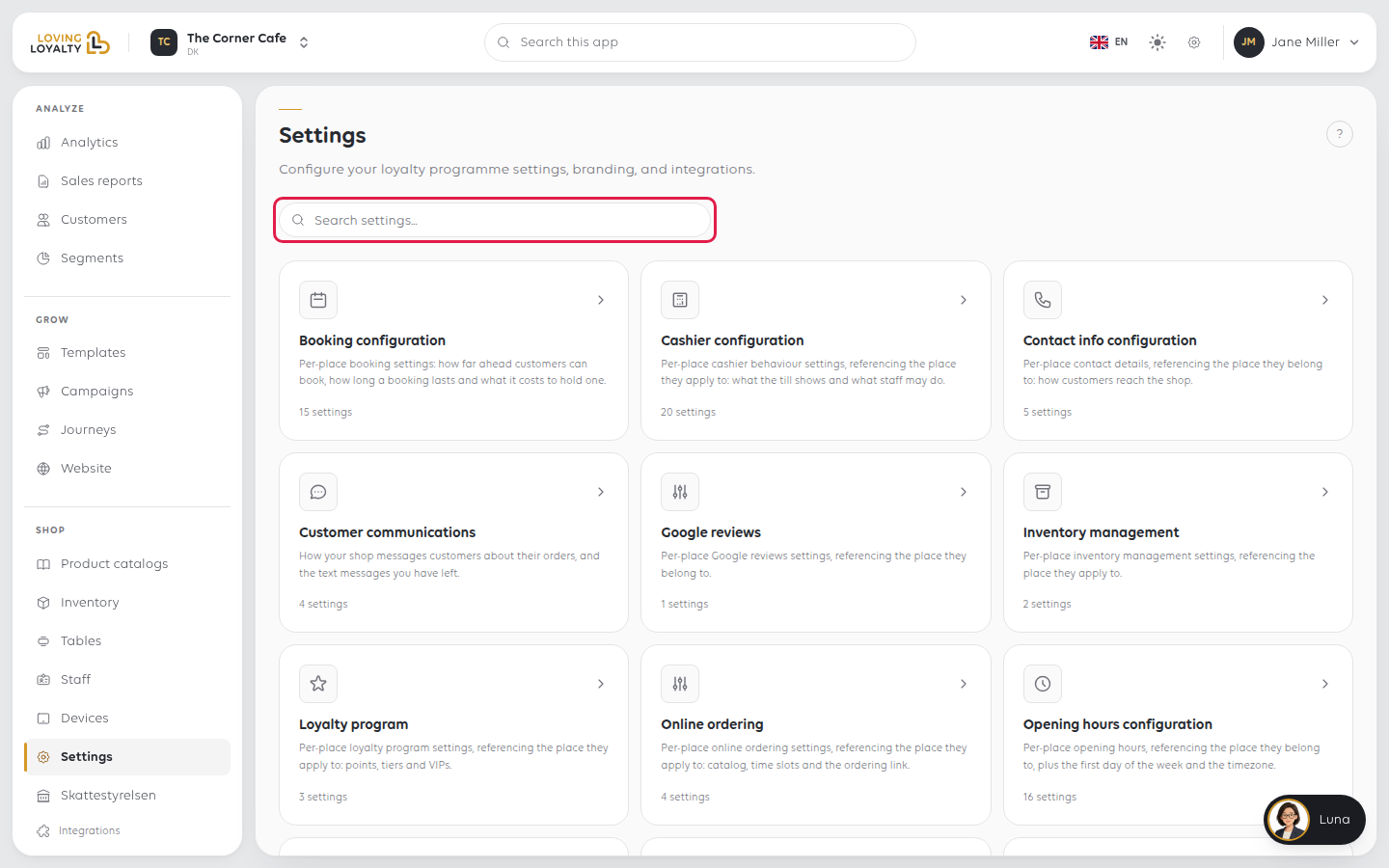
Settings lists each group as a card with a short description and how many
settings it holds. Select a card to open the group.
| Group | What it covers |
|---|---|
| Booking configuration | How far ahead customers can book, how long a booking lasts and what it costs to hold one |
| Cashier configuration | What the till shows and what staff may do |
| Contact info configuration | How customers reach the shop |
| Customer communications | How the shop messages customers about their orders |
| Google reviews | Review prompts |
| Inventory management | Stock behaviour |
| Loyalty program | Points, tiers and VIPs |
| Online ordering | Catalogue, time slots and the ordering link |
| Opening hours configuration | Opening hours, the first day of the week and the timezone |
| Order management | How orders are taken: order types, VAT, payment defaults |
Further down are Receipt configuration, Reporting configuration,
Self-service kiosk configuration, Visual presence and Place. Inside a
group, a list of every group runs down the left on a computer screen, so you can
move to the next one in one click.
The number on each card counts the settings you can see right now. Some settings
only appear once another one is switched on, so the number can go up when you turn
a feature on.
Search
Type in Search settings... above the cards to look through every group. It
matches a setting's name and description, shows the group it belongs to above each
match, and you can change the setting right there in the results.
Inside a group, the search box looks in that group only.
Settings belong to a location
A setting changed here applies to the shop selected at the top of the screen
only. A chain changes each shop separately. When two shops behave differently, the
cause is usually one setting, not anything deeper.
When a setting is not there
Check these in order:
- It only appears once another setting is on. Many settings stay hidden until
the setting they depend on is switched on or filled in, and search does not find
them while hidden. Turn on the main switch for that feature first. - It is in another group. Order management covers how an order is taken;
cashier configuration covers how the till behaves for staff. - The feature is not on your plan, or your role cannot see it. A group with
nothing you can see is not shown at all. See Your plan and invoices.
If something goes wrong
| What you see | What it means | What to do |
|---|---|---|
| A setting you changed did nothing at the till | Tills read settings when they load | Reload the till |
| Two shops behave differently | Settings are per shop | Compare the same group in both |
| A whole group is missing | Not on your plan, or not for your role | Check the plan, then contact support |
Was this article helpful?
Thanks for your feedback!
