

 Dansk
 Svenska
 Deutsch
 Norsk bokmål
Booking configuration
Booking configuration decides what your guests can book, how long a booking lasts
and how far ahead they can book.
Open Shop → Settings → Booking configuration, or type booking in Search
settings... to list them all with their group above each one.
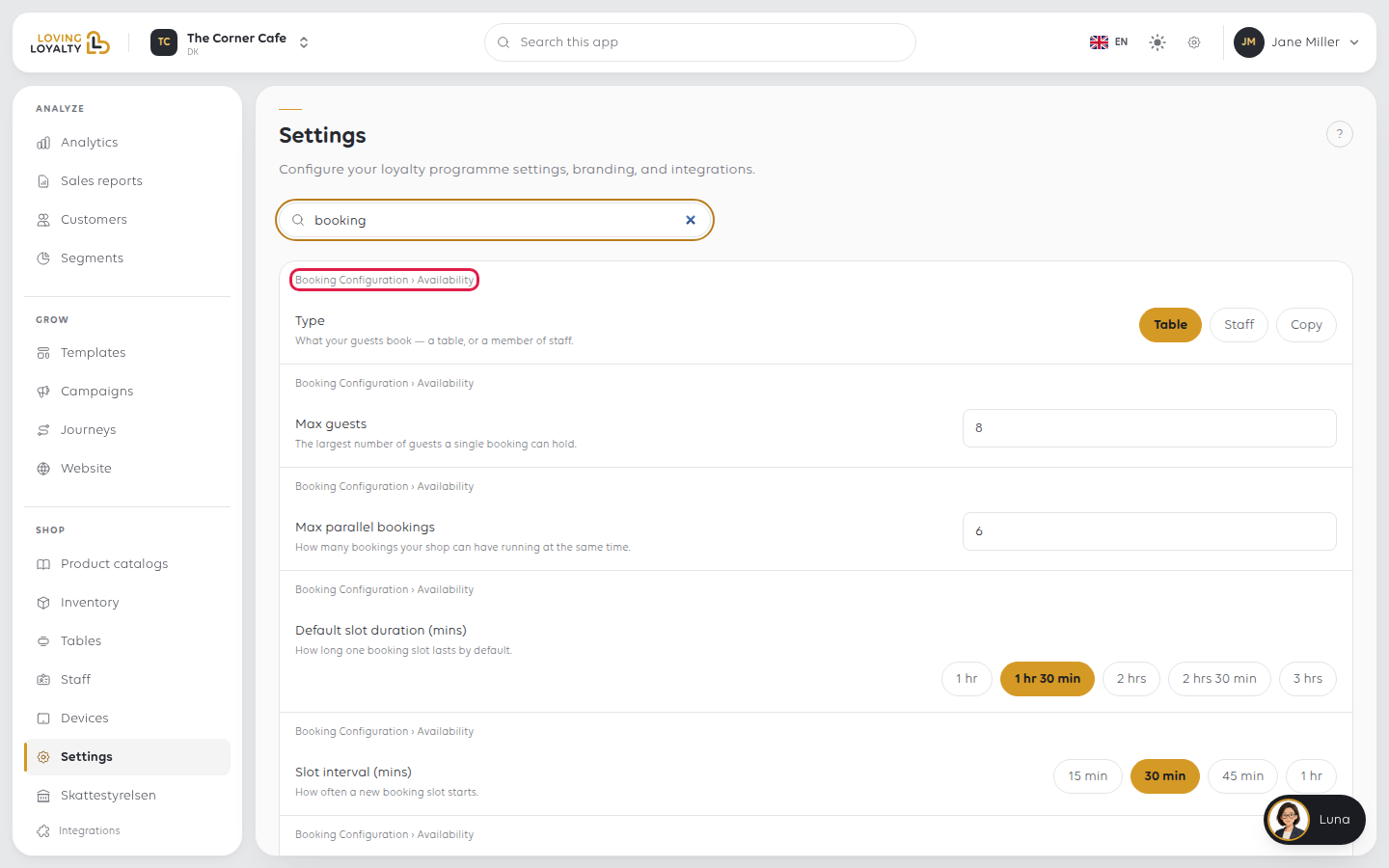
Switches and choices save as soon as you change them. A field you type in, such as
Max guests, shows Save once you change it.
Availability - what is being booked
Type decides what customers book:
| Type | For | What to set up next |
|---|---|---|
| Table | A restaurant booking tables | Set up tables and the floor plan |
| Staff | A service booking appointments - hairdresser, clinic, salon | Make a staff member bookable |
The settings in this group are the shop's defaults. With Staff bookings, every
staff member you make bookable starts with these values, and each of them then has
their own booking settings on their record (Shop → Staff, Edit). See Make a
staff member bookable.
| Setting | Decides |
|---|---|
| Max guests | The largest number of guests one booking can hold |
| Max parallel bookings | How many bookings can run at the same time |
| Default slot duration (mins) | How long one booking lasts, from 1 hr to 3 hrs |
| Slot interval (mins) | How often a new slot starts - 15 min, 30 min, 45 min or 1 hr |
Duration is how long a guest keeps the table; interval is how often a new booking can
start. With a 1 hr 30 min duration and a 30 min interval, guests can book at 18:00,
18:30, 19:00 and so on, and their bookings overlap. Max parallel bookings caps how
many run at once. If you want everyone to start together, set the interval to the
same length as the duration.
Timing
| Setting | What it decides |
|---|---|
| Minimum lead time | How long before the start time a guest can still book - none, 4, 8 or 24 hours |
| Cancellation window | How long before a booking starts a guest can still cancel |
| Arrival offset | How early the guest should arrive |
| Buffer before | Time kept free before a booking can start |
| Buffer after | Time between one booking ending and the next starting |
Payment and customer
| Setting | What it decides |
|---|---|
| Standard deposit amount | What guests pay up front when they book |
| Auto-confirm bookings | Whether a booking confirms itself, after payment where one applies |
| Phone | The number guests call about their booking |
| Terms and Conditions | What guests accept before a booking is confirmed |
| Link | The web address guests use to book - see Let customers book online |
Getting the combination right
Most booking problems come from two settings working against each other:
| Symptom | Likely cause |
|---|---|
| No slots offered today | Minimum lead time rules out what is left of the day, or Max parallel bookings is already reached |
| Slots appear when you are full | Max parallel bookings is higher than you can seat |
| Tables held too long | Default slot duration is longer than a sitting takes |
| Too many bookings overlap | Slot interval is shorter than the duration and Max parallel bookings is too high |
Change one setting at a time and check the booking page afterwards, so you know
which change did what.
Was this article helpful?
Thanks for your feedback!
