

 Dansk
 Svenska
 Deutsch
 Norsk bokmål
An order is stuck or shows the wrong status
An order is outlined in red, or says something you do not expect. This explains what
the till is telling you and what to do about it.
The red frame means money is outstanding
An order with a red dashed frame and a red banner has not been fully paid.
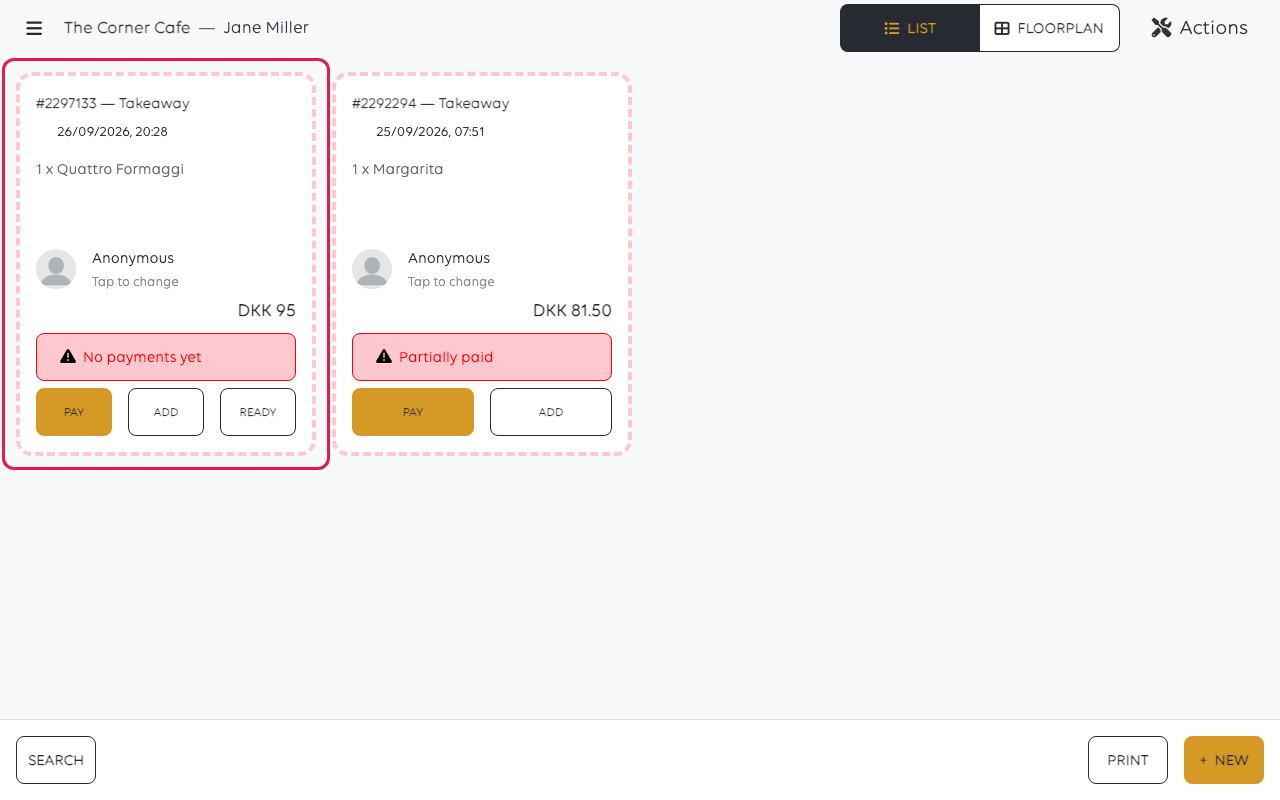
| Banner | Means |
|---|---|
| No payments yet | Nothing has been collected |
| Partially paid | Some money is in, and some is still owed |
Neither is a fault. The till is flagging an order you would otherwise walk past, which
is exactly what you want at the end of the day.
Partially paid, and you did not mean to split it
The usual cause is the cash keypad. It fills from the right, in the smallest unit of
the currency, so typing 1, 5, 0 gives DKK 1.50 rather than DKK 150 — and the till
accepts the smaller amount as a part payment rather than querying it, because paying
part of a bill is a normal thing to do.
Open the order and take the rest. See Split a payment across methods.
A card payment that does not show as paid
A payment counts when the till shows it as Settled. Anything else — approved on
the terminal, or nothing at all — means the till has not been told.
- Open the order and read the payments list on its detail. It shows each payment
with its status and time. - If the terminal shows an approval and the till shows nothing, do not take the
payment again. Check the payments screen from the menu before charging twice. - If the payment is genuinely missing, take it again and watch for Settled.
An order that will not go away
| What you see | What it means | What to do |
|---|---|---|
| A paid order stays in the list | It has not been closed | Use Actions → Close all paid orders — see Clear the order list at the end of the day |
| An unpaid order nobody will collect | It is waiting for money that is not coming | Cancel it — see Change an order after it is placed |
| An old parked order | It was set to be paid later | Settle or cancel it before the end-of-day process |
| The order is not in the list | It is older than today | Use SEARCH — see Find an order |
Before the end of the day
Red-framed orders are the ones to deal with before the end-of-day process, because
they are the difference between your sales and your takings. An order that stays
unpaid is counted as sold and not as taken — see Close the shop with an X or Z
report.
If a refund will not apply
A refund that is confirmed but leaves the order unchanged is not something you can fix
from the till. Note the order number and contact support — see Get help from inside
the app. Do not repeat it: a refund that did work and did not display would refund
twice.
Was this article helpful?
Thanks for your feedback!
