

 Dansk
 Svenska
 Deutsch
 Norsk bokmål
Open the cash drawer without a sale
Open the cash drawer without a sale
Sometimes the drawer has to open when nothing is being sold - to give change for a
note, to put a float in at the start of the day, or to check the drawer against the
till.
Before you start
- A cash drawer is connected. The drawer is opened by the receipt printer, so a till with no printer has no way to open one.
Open it from the till
On the home screen, tap CASH at the bottom left, then tap Open Cash Drawer.
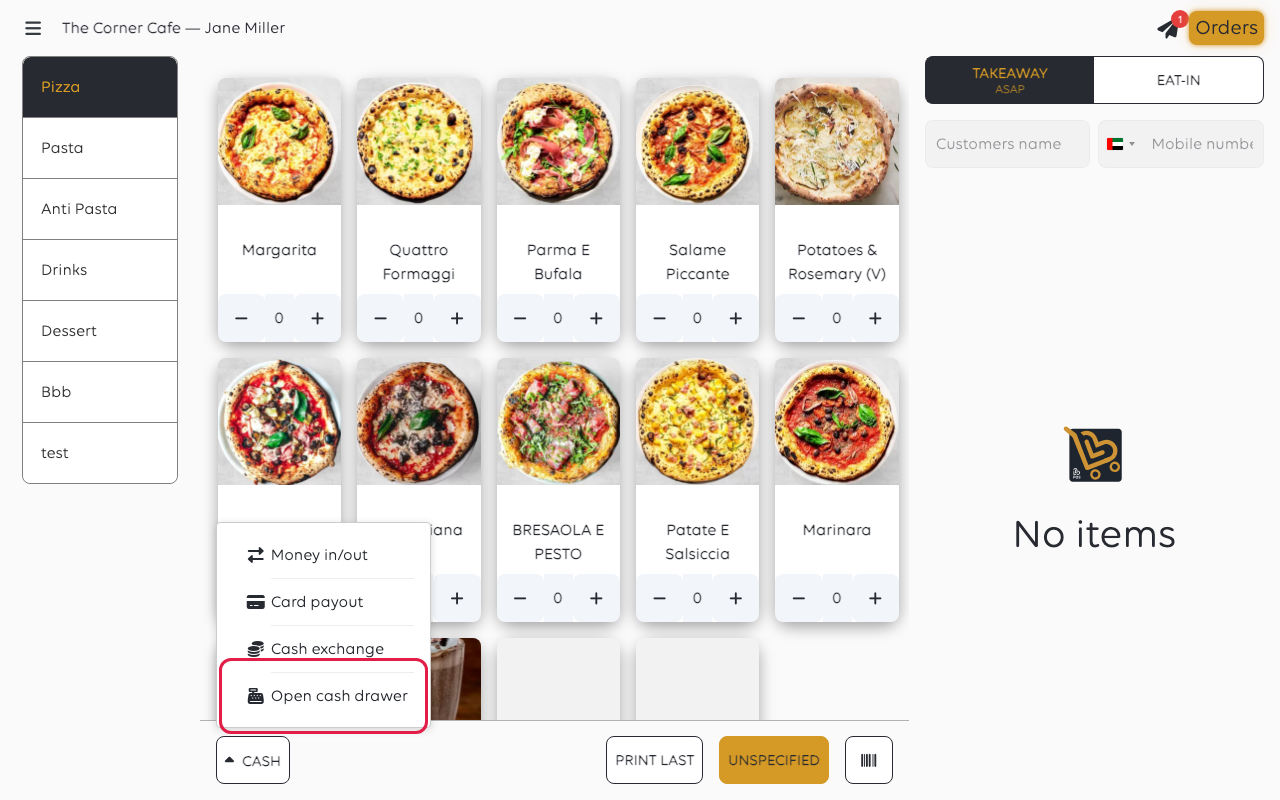
The drawer opens and Cash drawer opened shows. If no printer is set up to open
a drawer, you see No printer available for cash drawer instead.
Open it from the printer's settings
You can also open it from the printer itself, which shows which printer is being
asked - handy in a shop with more than one. Open the menu, tap Receipt printers, tap the printer, and tap Open Cash Drawer on
the Edit receipt printer screen.
If the drawer does not open
| What to check | Why |
|---|---|
| The printer is on and has paper | The drawer is opened through the printer; a printer that is off cannot pass the instruction on |
| The drawer cable is in the printer | The drawer is driven from the printer's own port, not from the till |
| The Cash Drawer setting on the printer | Under Receipt printers, tap the printer. If Cash Drawer is None, set it to Generic and tap SAVE RECEIPT PRINTER |
Was this article helpful?
Thanks for your feedback!
