

 Dansk
 Svenska
 Deutsch
 Norsk bokmål
Organise staff into categories
Categories group your staff, such as waiters, kitchen, bar or part-time, so your team
list reads like your rota rather than a list of names.
A category is not a role. It changes nothing about what anyone can do. For that, see
Change what a staff member can do.
Add a category
Open Shop → Staff. Categories sits above the staff list. Type the name in the
New category box and select Add (or press Enter). The category appears in the
list.
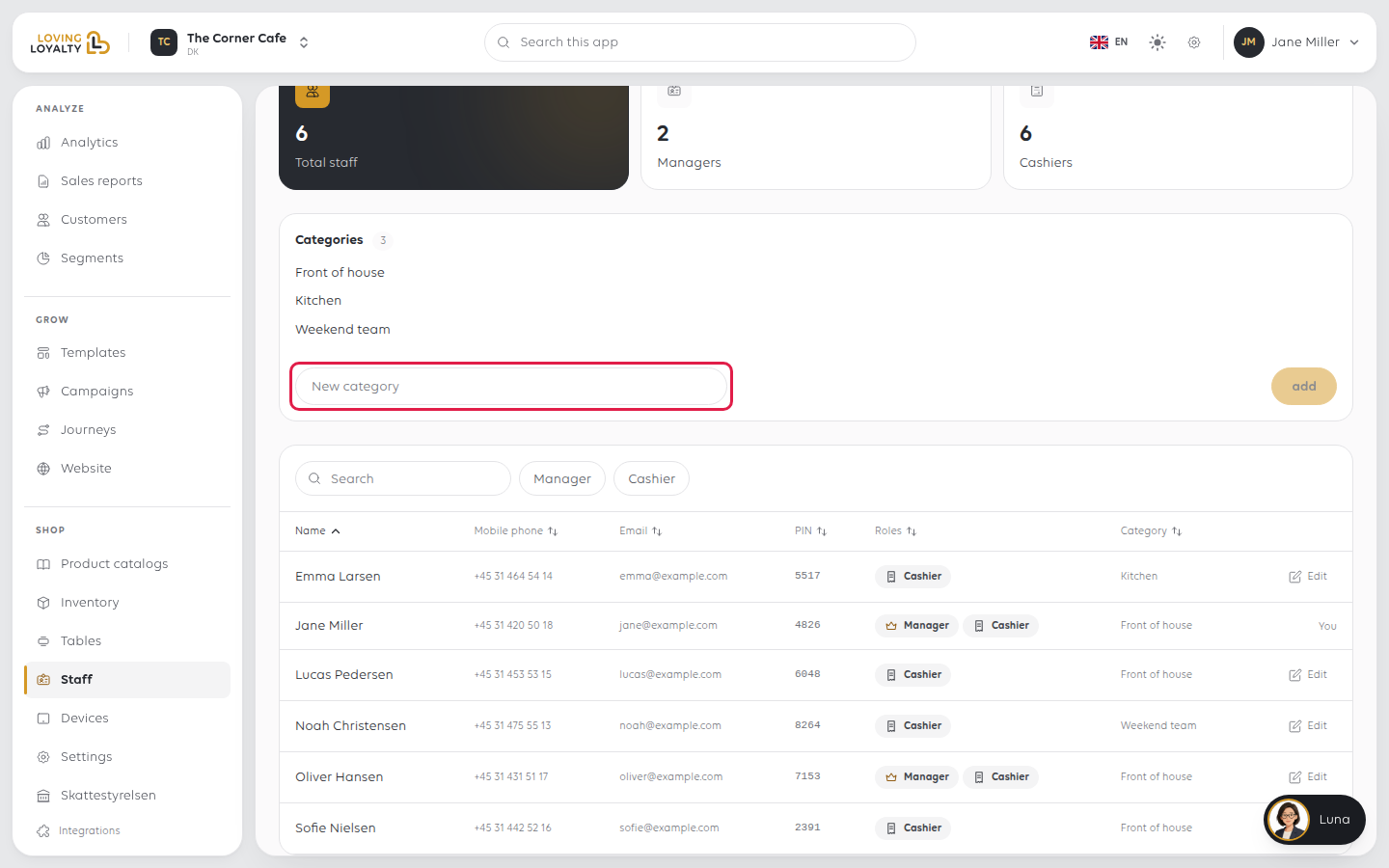
To rename one, select Edit, change the name and select Save. Everyone already
in it stays in it.
Put people in them
Select Edit on a person's row, then select a category under Category. It saves
straight away.
Everyone starts on None until you change it. You can also pick a category when
you add someone. See Add a staff member.
If something goes wrong
| What you see | What it means | What to do |
|---|---|---|
| Everyone shows None | The categories exist but nobody is in one | Set each person's category from their own page |
| A category is no longer wanted | It can be removed | Select Delete on it and confirm |
| Reports do not split by category | Staff were categorised after the period you are looking at | Categories apply from when they are set, not backwards |
Was this article helpful?
Thanks for your feedback!
