

 Dansk
 Svenska
 Deutsch
 Norsk bokmål
Find a cashier's PIN
Find a cashier's PIN
Every cashier signs in on the till with their own PIN. If someone has forgotten
theirs, a manager can look it up in the manager app.
Before you start
- You are a manager of the shop, signed in to the manager app.
Look it up
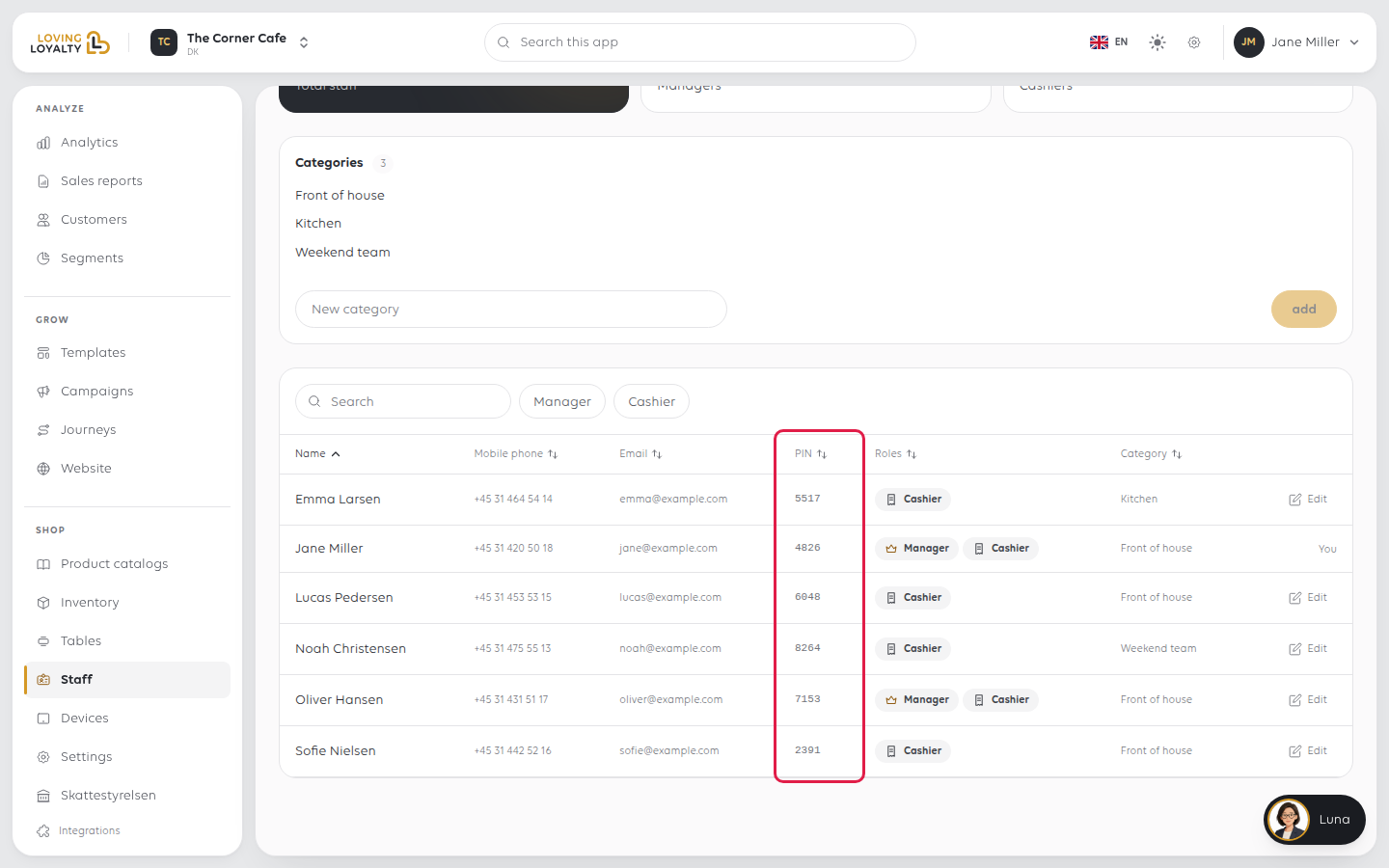
- In the sidebar, open Shop and then Staff.
- The staff list has a PIN column. Find the person and read their PIN there.
- Or open the person: their page shows PIN under their name.
When you add someone
The PIN is shown the moment you create a staff member, as Their PIN code is
followed by the number. Give it to them then. You can always look it up again later
in the staff list. See Add a staff member.
Keep it to the person
A PIN says who is working the till: sales, clock-ins and cash are recorded against
it. Each person should use only their own, so do not share one PIN between cashiers.
If something goes wrong
| What you see | What it means | What to do |
|---|---|---|
| The PIN column shows a dash | The person has no PIN at this shop | Check they are set up as staff at this shop |
| The till does not accept the PIN | It is someone else's, or the person is not staff at this shop | Look it up again in Staff; see Sign in to the POS |
Was this article helpful?
Thanks for your feedback!
